JS and Advanced HTML
Final Project - Guess My Number Game
The final project for my JavaScript and AJAX course is a Number Guessing game.
Guess My Number Final Project
These are the parameters that need to be met:
Create a Web page that features the Guess My Number game using a combination of XHTML Strict, CSS, and JavaScript with the following functionality:
- Game Created in Table (4 points)
- Game Logo from instructor
- Range Header Text
- Input fields to Indicate Number Range in To-From Format
- Input field for Guessed Number
- Start Button to Start Game (10 points)
- Button styled with CSS (4 points)
- Set focus to From textbox (4 points)
- Generate random number in To-From Range (10 points)
- Set focus to Guess textbox (4 points)
- Guess Button to Process Guess (10 points)
- Button styled with CSS (4 points)
- Reset textbox and set focus to Guess textbox after incorrect guess (4 points)
- If Guess is not in From-To range
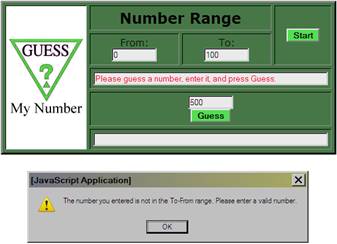
- Alert stating "The number you entered is not in the From-To range. Please enter a valid number." (4 points)
- Instruction text area in RED text to indicate the following messages: (4 points)
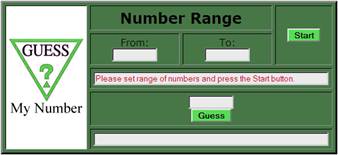
- "Please set range of numbers and press the Start button." (4 points)
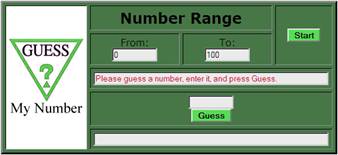
- "Please guess a number, enter it, and press Guess." (4 points)
- "My number is greater than 'guessed number'." (Where 'guessed number' is actual number guessed.) (4 points)
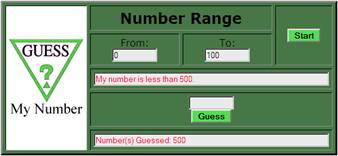
- "My number is less than 'guessed number'." (Where 'guessed number' is actual number guessed.)
(4 points)
- Guesses text area in RED text to indicate the following message: (4 points)
- "Number(s) Guessed: 'num1 num2 etc.' (Where 'num1 num2 etc.' are actual numbers guessed.) (4 points)
- If Guess is Correct
- Alert indicating how many attempts it took to guess number (10 points)
- Reset form (without button) after correct guess to beginning status (4 points)
Your project should be completely functional in the latest versions of Internet Explorer and Firefox. Your project will be graded based on:
- the completion of the above criteria
- correctness of all code
- how closely the page resembles the screen shots below (table background color is #477747 and button color is #55dd55)
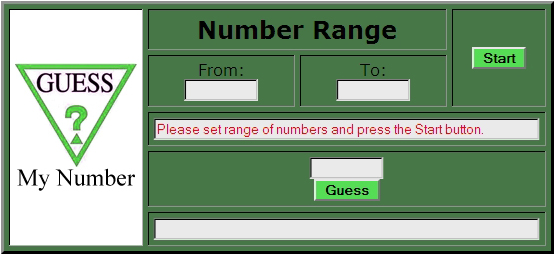
Initial Screen
Screen After Visitor Enters a Range and Message is Displayed
Screen After Visitor Enters an Invalid Guess and Alert is Displayed
Screen After Incorrect Guess is Made Displaying Message and Displaying Guessed Number
Screen After Multiple Incorrect Guesses are Made Displaying Message and Displaying Guessed Numbers
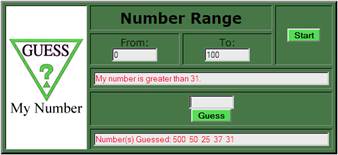
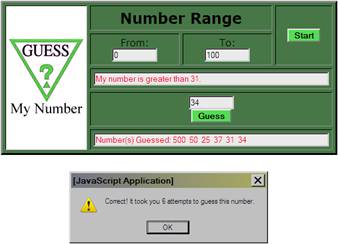
Screen After Correct Guess is Made Displaying Guessed Numbers and Displaying Alert with Number of Attempts
| Final Project |
 |